 0
komentar
0
komentar
You can make your folder or files hidden simply inside your computer. This is doesnt need any software or tools to make so. This is not harm your folder or files and this is a simple trick.
Learn now how to make your folders, files or drive is visible.
These the instructions:
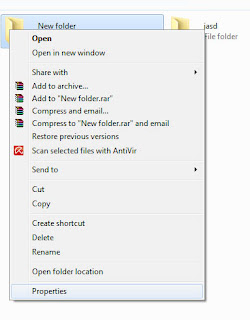
First, just right click any file or folder that you wanna hide. You must click on properties.
Example of screen shot
Read more
Learn now how to make your folders, files or drive is visible.
These the instructions:
First, just right click any file or folder that you wanna hide. You must click on properties.
Example of screen shot
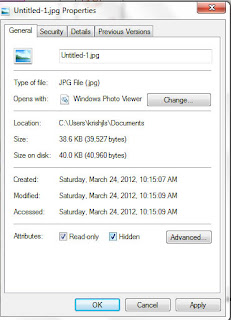
Then you may see a files properties shown and you click on hidden.
Example of shot screen
Then, click apply and click OK. simple right.
You can unhidden you files or folder by following these steps below:
1. Go to My computer.
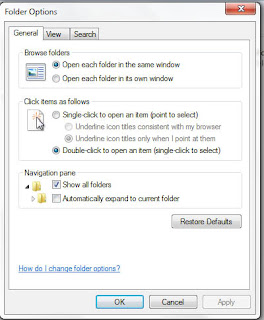
2. Then click on tools tab and click on folder option
Example of screen shot
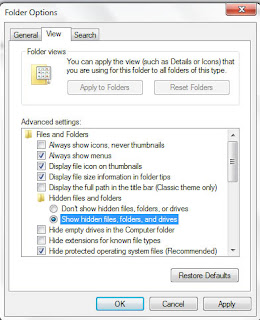
3. And then choose view choose a show a hidden files and folder.
Example of screen shot
Finally click apply and OK. You show find the file or folder in same location that you hide them. It is more safe if choose Dont show a hidden files, folder or drive back for safely purpose.
Hope this information is useful to you.


